

Console Updating - SaaS
XDR Forensics provides a controlled and predictable update process for SaaS tenants by using maintenance windows. These windows allow you to define exactly when updates may occur, helping you align upgrades with organisational change-control processes and minimise operational impact.
All update settings are available from:
Settings → Update
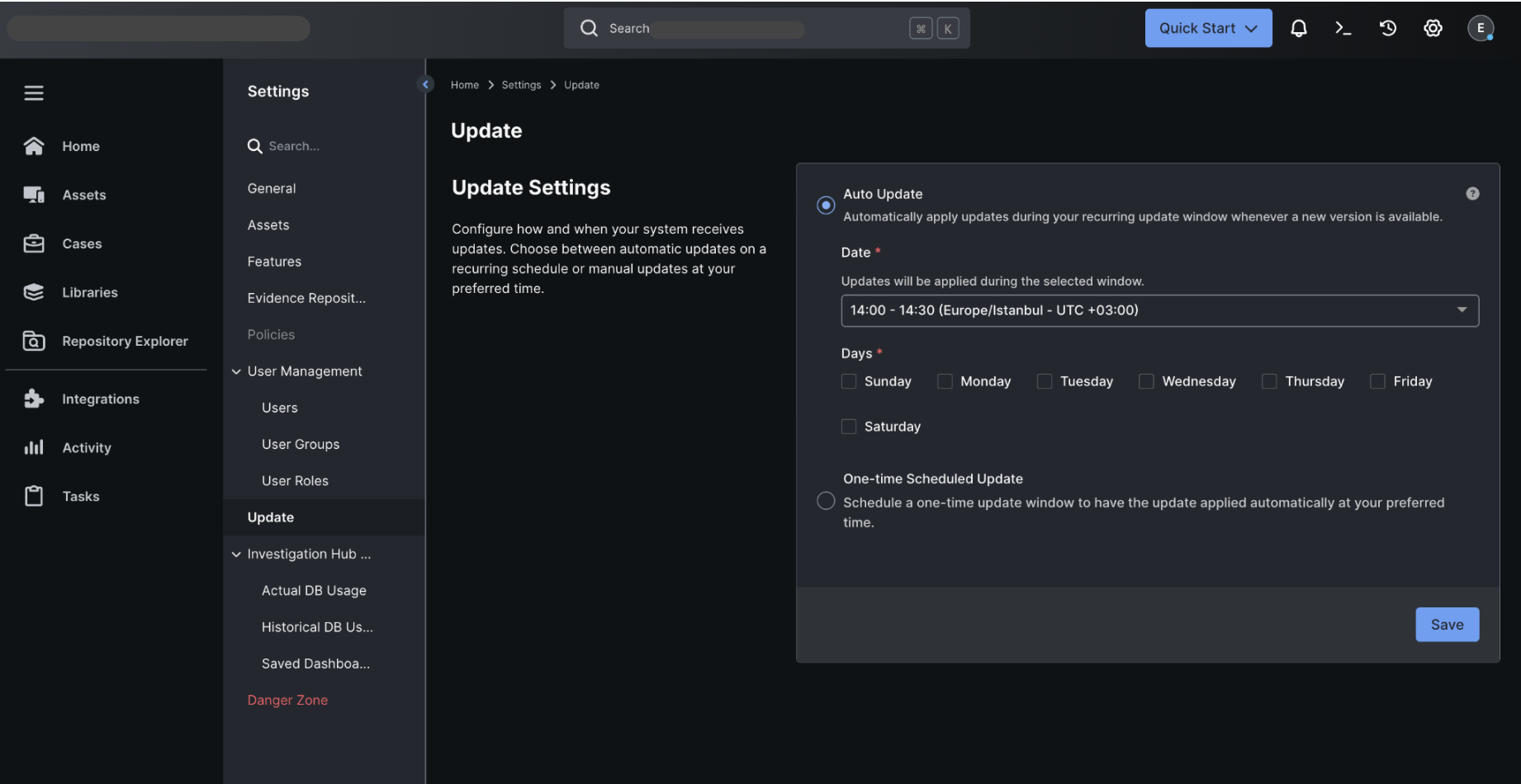
Console Updating SaaS: The UI for SaaS maintenance
Update Methods
Section titled “Update Methods”Auto Update (Recurring Maintenance Window)
Section titled “Auto Update (Recurring Maintenance Window)”Auto Update allows XDR Forensics to automatically install new versions during a recurring update window that you configure.
When Auto Update is enabled, you can define:
Time Window
Select a 30-minute update window (e.g., 02:00–02:30 or 14:00–14:30 (Europe/Istanbul – UTC +03:00)).
Updates will only run within this defined window.
Days of the Week
Choose one or more days on which updates are permitted (e.g., Monday–Friday, Saturday only, or Wednesday).
At least one day must be selected.
How it works:
When a new version becomes available, XDR Forensics identifies the next selected day and applies the update during the time window you have configured.
One-time Scheduled Update
Section titled “One-time Scheduled Update”Use a One-time Scheduled Update when you want to apply the next update at a specific upcoming window outside your normal recurring schedule.
- When selected, XDR Forensics displays the next available maintenance windows.
- Choose your preferred window and save the configuration.
- The system will update once during that window and then revert to your existing Auto Update settings.
This option is ideal for:
- Alignment with a formal change-control event
- Situations where you want to temporarily override your regular update pattern
- Urgent updates that cannot wait for the next recurring window
Disabling Automatic Updates
Section titled “Disabling Automatic Updates”If you wish to temporarily halt updates:
- Set Auto Update to off
- Ensure One-time Scheduled Update is not selected
Your tenant will not update until a new maintenance window is configured.
Update Status Information
Section titled “Update Status Information”The Update Settings page displays your current version, for example:
Your system is up-to-date – v5.7.0.xxxxxIf an update has been scheduled, the page will show:
- The update version
- The scheduled maintenance window
- Any relevant notifications
Summary
Section titled “Summary”XDR Forensics’s SaaS update management offers:
- Controlled and predictable updates
- Recurring and one-time maintenance window options
- Full alignment with change-control practices
- Built-in automatic backups for safety
These controls ensure uninterrupted operation while keeping your environment consistently up-to-date.